BDG Game recharge and BDG Win deposit overview
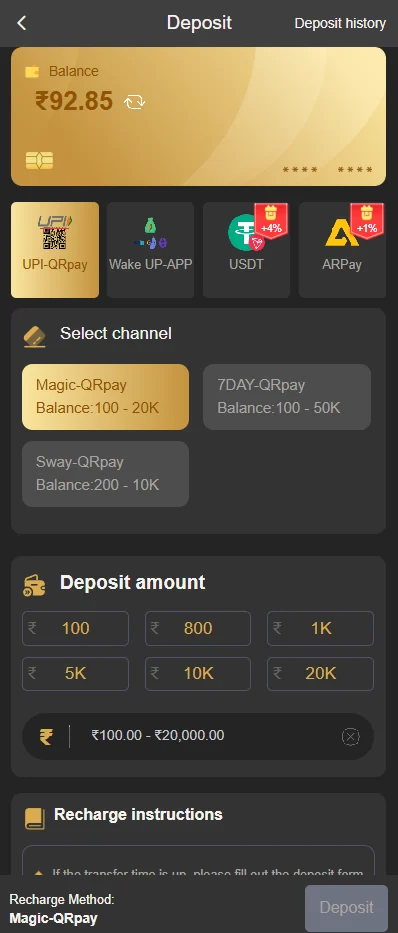
Use the wallet area inside the authenticated account. The supplied screen shows payment channels, preset amounts, a custom amount field and recharge instructions, but current options can change.
How to complete a BDG Game recharge
- Complete BDG Game login and verify the account ID.
- Open the BDG Game wallet or deposit section.
- Select a payment channel currently shown inside the account.
- Enter the intended amount and review the minimum or maximum displayed.
- Complete the payment once and wait for the status.
- Save the UTR, order ID, amount and exact time.
- Confirm wallet credit before opening a paid game.
BDG Win deposit checks before payment
- The account ID belongs to the correct user.
- The selected channel is visible in the current platform session.
- The payment recipient matches the generated order.
- The amount has no extra zero or decimal mistake.
- The payment app shows a final success, pending or failed status.
- A screenshot does not expose a full bank account or OTP.
BDG Game deposit not credited
When money is debited but the BDG Game wallet remains unchanged, first compare the platform order and payment-app status. A successful bank debit with a pending platform order needs reconciliation evidence, not another payment.
| Evidence | Why it helps |
|---|---|
| UTR or bank reference | Lets support locate the payment in the banking trail |
| Platform order ID | Connects the payment to the BDG Game deposit request |
| Amount and timestamp | Separates similar transactions |
| Payment status screenshot | Shows success, pending or reversal without sharing an OTP |
| Registered account ID | Prevents the issue being checked against the wrong account |
BDG Game recharge offers and ₹500 BDG Game bonus
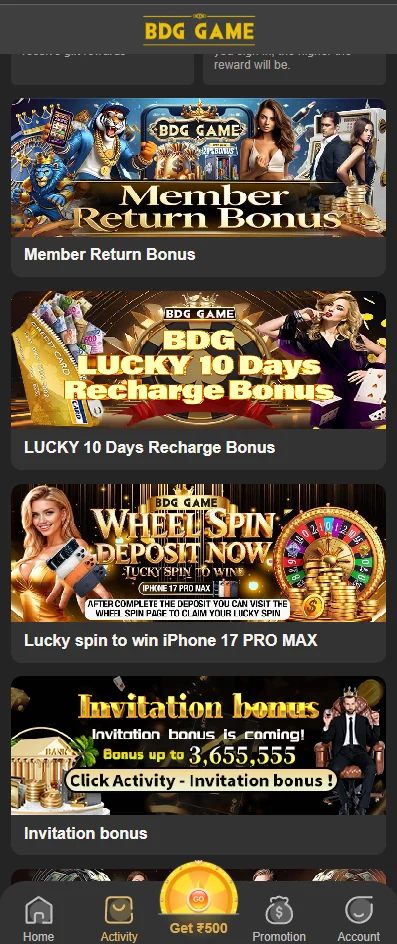
The activity screen can display recharge-related campaigns and the confirmed ₹500 BDG Game bonus. Read the live card before paying. A bonus balance can have different rules from deposited balance, and a promotional amount should not be assumed to be immediately withdrawable.
BDG Game deposit record keeping
Keep a simple private log containing the date, amount, UTR, platform order ID and final wallet status. This makes a real issue easier to explain and discourages impulsive repeated deposits. Do not store passwords, PINs or OTPs in the same log.
Understand BDG Game deposit payment statuses
| Payment-app status | BDG Game wallet status | Practical action |
|---|---|---|
| Successful | Credited | Save the receipt and verify the final wallet amount |
| Successful | Pending or missing | Keep UTR and order ID; request reconciliation |
| Pending | Not credited | Wait for bank resolution; do not repeat immediately |
| Failed | Not credited | Check whether the bank reverses the amount |
| Reversed | Not credited | Confirm funds returned before creating a new order |
Why the live BDG Game payment channel matters
Payment recipients and channels can rotate. A screenshot from yesterday or a number sent in a group should not replace the instructions generated inside the current account session. Start a fresh order, confirm the displayed recipient and do not reuse an old QR code without checking it.
Control BDG Game recharge frequency
Set a daily or weekly entertainment limit before opening the deposit screen. A recharge promotion should not push the amount beyond that limit. When a payment is pending, wait for a clear final status instead of making several deposits that are difficult to track.
- One order for one intended payment.
- A private log of amount, UTR and wallet result.
- No payment from borrowed or essential funds.
- No private bonus activation or account verification transfer.
- A pause after the planned limit is reached.
BDG Game deposit support message example
A useful message states: registered account ID, deposit order ID, UTR, amount, payment date and time, payment-app status and current wallet status. It should not contain a password, OTP, UPI PIN or full card number. Submit it through the support option inside the authenticated account.
BDG Game recharge failed, reversed or duplicated
A failed payment can still show a temporary bank hold, while a reversed payment can take time to appear in the source account. Check the final bank status before creating a new BDG Game deposit order. When two payments were made accidentally, record both UTRs separately; do not describe them as one transaction.
Expired BDG Win deposit order
Payment orders can have a limited active window. If the order expired before payment completed, the bank reference and platform order may not match automatically. Submit both records through authenticated support and avoid sending money again to the old recipient.
Wrong BDG Game deposit amount
When the paid amount differs from the generated order, keep the exact receipt and do not alter screenshots. A clear factual report gives support the best chance to reconcile the payment. Do not pay an extra difference to a personal account unless the authenticated platform creates a new official order.
Use deposit controls as financial boundaries. Remove saved payment shortcuts when they make repeated deposits too easy, and pause promotional notifications when they encourage spending beyond the planned entertainment amount.
BDG Game deposit privacy and screenshot safety
A payment screenshot can expose the user’s name, phone number, UPI ID, account ending and bank balance. Crop or mask unrelated details while keeping the UTR, amount, time and status readable. Never include the UPI PIN or OTP.
Send evidence only through the authenticated support route. Publicly posting a failed deposit can attract impersonators who claim they can credit the wallet in exchange for another transfer.
BDG Game recharge summary before confirmation
Confirm the account, live order, payment recipient, amount and funding source. The user should be able to explain the purpose of the payment and afford a complete loss without affecting essential expenses.
After payment, wait for a final status and record the result. A bonus banner, countdown or support message should never override the one-payment, one-order rule or the user’s fixed entertainment limit.
BDG Game Recharge FAQs
How do I start a BDG Game recharge?
Log in, open the wallet or deposit area, select a live payment channel, enter the amount and save the transaction reference.
What is the difference between BDG Game recharge and BDG Win deposit?
They are commonly used phrases for adding funds to the account wallet. This guide covers both on one page.
Why is my BDG Game deposit not credited?
Payment processing, an incorrect channel, an expired order or reconciliation delay can cause a mismatch. Keep the UTR, amount and time.
Should I make another BDG Game deposit when the first is pending?
Do not repeat the same payment immediately. Check the status and contact in-account support with the first transaction evidence.
Can a support agent ask me to send a verification payment?
Treat any request to pay a private account to unlock or verify a deposit as high risk.
Where can I find the BDG Game deposit reference?
The payment app, bank statement and platform order history may each show a reference. Save all available identifiers.
Does the ₹500 BDG Game bonus require a deposit?
The offer is available, but this guide does not invent its current eligibility. Read the live bonus card and conditions in the account.
Can BDG Game deposit methods change?
Yes. Use only the methods displayed inside the authenticated account at the time of payment.
BDG Game recharge final note
One current order, one verified recipient and one saved transaction reference create the clearest BDG Win deposit record. When the status is unresolved, wait and reconcile it instead of creating more payments. No bonus or countdown should override the user’s original entertainment limit.